
library(mongolstats)
library(sf)
library(dplyr)
library(ggplot2)
nso_options(mongolstats.lang = "en")

# Global theme with proper margins to prevent text cutoff
theme_set(
  theme_minimal(base_size = 11) +
    theme(
      plot.margin = margin(10, 10, 10, 10),
      plot.title = element_text(size = 13, face = "bold"),
      plot.subtitle = element_text(size = 10, color = "grey40"),
      legend.text = element_text(size = 9),
      legend.title = element_text(size = 10)
    )
)
Overview
Geographic analysis is essential for understanding health disparities and targeting interventions. This guide demonstrates spatial epidemiology using Mongolia’s aimag-level (provincial) health data.
Getting Boundary Data
Mongolia’s administrative boundaries are available at three levels:
# ADM0: National boundary
country <- mn_boundaries(level = "ADM0")

# ADM1: Aimags (21 provinces + Ulaanbaatar)
aimags <- mn_boundaries(level = "ADM1")

# ADM2: Soums (districts)
soums <- mn_boundaries(level = "ADM2")

# Quick preview
aimags |>
  ggplot() +
  geom_sf(fill = "white", color = "grey30", size = 0.3) +
  theme_void() +
  labs(title = "Mongolia's 21 Aimags + Ulaanbaatar")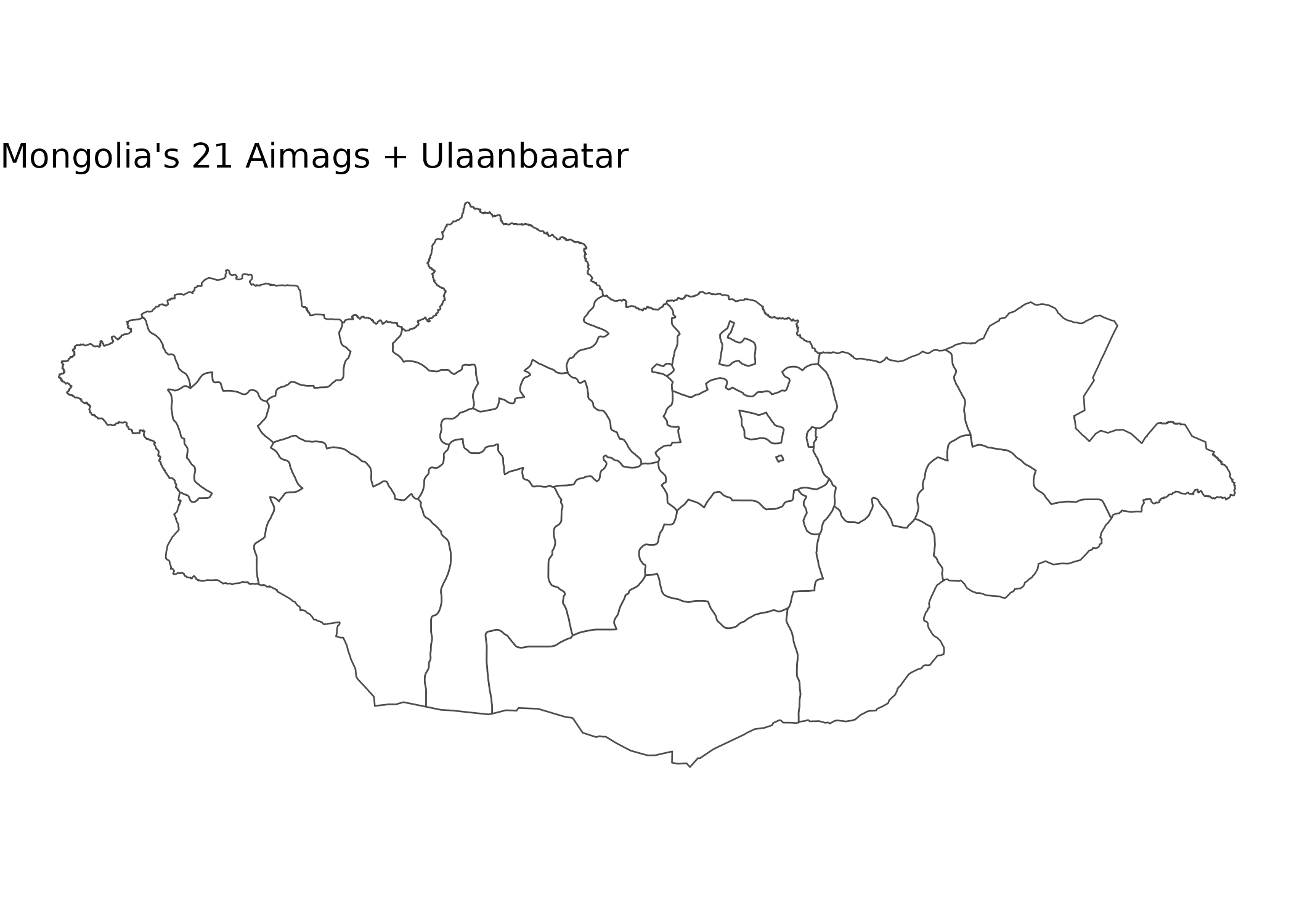
Case Study: Maternal Mortality Geography
Understanding Regional Disparities
Maternal mortality is a critical indicator of health system performance and equity.
# Fetch maternal mortality data for all aimags (2020-2024)
# We'll calculate a 5-year average to smooth out year-to-year variability
# This is important because small populations can have unstable rates

# The table is monthly; map month labels ("YYYY-MM") to codes for 2020-2024
mmr_tbl <- "DT_NSO_2100_050V1" # MMR per 100,000 live births
mmr_months <- nso_dim_values(mmr_tbl, "Month", labels = "en") |>
  filter(label_en >= "2020-01", label_en <= "2024-12") |>
  pull(code)

mmr_data <- nso_data(
  tbl_id = mmr_tbl,
  selections = list(
    "Region" = nso_dim_values(mmr_tbl, "Region")$code,
    "Month" = mmr_months
  ),
  labels = "en"
) |>
  filter(!Region %in% c("0", "1", "2", "3", "4", "511")) |> # Exclude Total, Regions, and duplicate UB
  mutate(Region_en = trimws(Region_en)) |>
  # Average the monthly values across 2020-2024 to reduce random variation.
  # Caveat: maternal deaths are rare events, so monthly "MMR per 100,000" is
  # extremely noisy at the aimag level. A mean of monthly ratios is a
  # smoothing device, not a true pooled 5-year ratio (which would be total
  # maternal deaths / total live births x 100,000). Read the map as relative,
  # not as exact rates.
  group_by(Region_en) |>
  summarise(value = mean(value, na.rm = TRUE), .groups = "drop")

# Preview data
mmr_data |>
  arrange(desc(value)) |>
  select(Region_en, value) |>
  head(10)
#> # A tibble: 10 × 2
#>    Region_en   value
#>    <chr>       <dbl>
#>  1 Arkhangai    75.9
#>  2 Dornogovi    67.8
#>  3 Khovd        67.6
#>  4 Bayan-Ulgii  65.2
#>  5 Tuv          63.8
#>  6 Dornod       54.1
#>  7 Khuvsgul     53.2
#>  8 Sukhbaatar   50.6
#>  9 Ulaanbaatar  48.6
#> 10 Selenge      48.0
Creating a Choropleth Map
# Join health data to geographic boundaries for spatial analysis.
# mn_fuzzy_join_by_name() reconciles transliteration differences between the
# NSO English names and the boundary spellings automatically (normalize +
# fuzzy match), so we don't maintain a hand-written name crosswalk that would
# silently drop provinces to grey when a spelling doesn't match exactly.
# max_distance = 3 is needed because NSO's "Khuvsgul" is string distance 3
# from the boundary spelling "Hovsgel"; all other pairs match at <= 2.
mmr_map <- mn_fuzzy_join_by_name(
  mmr_data,
  name_col = "Region_en", level = "ADM1", max_distance = 3
)

# Create choropleth map
p <- mmr_map |>
  ggplot() +
  geom_sf(aes(fill = value), color = "white", size = 0.2) +
  scale_fill_viridis_c(
    option = "rocket",
    direction = -1,  # dark = high mortality (concerning)
    name = "MMR\n(per 100k)",
    labels = scales::label_number()
  ) +
  labs(
    title = "5-Year Average Maternal Mortality Ratio (2020-2024)",
    subtitle = "Deaths per 100,000 live births (Mean)",
    caption = "Source: NSO Mongolia"
  ) +
  theme_void() +  # removes axes for clean map appearance
  theme(
    plot.title = element_text(face = "bold", size = 16),
    plot.subtitle = element_text(color = "grey40"),
    legend.position = "bottom",          # bottom legend maximizes map width
    legend.title = element_text(size = 10, face = "bold"),
    legend.key.width = unit(1.5, "cm")   # wider legend key for continuous scale
  )

p  # print static ggplot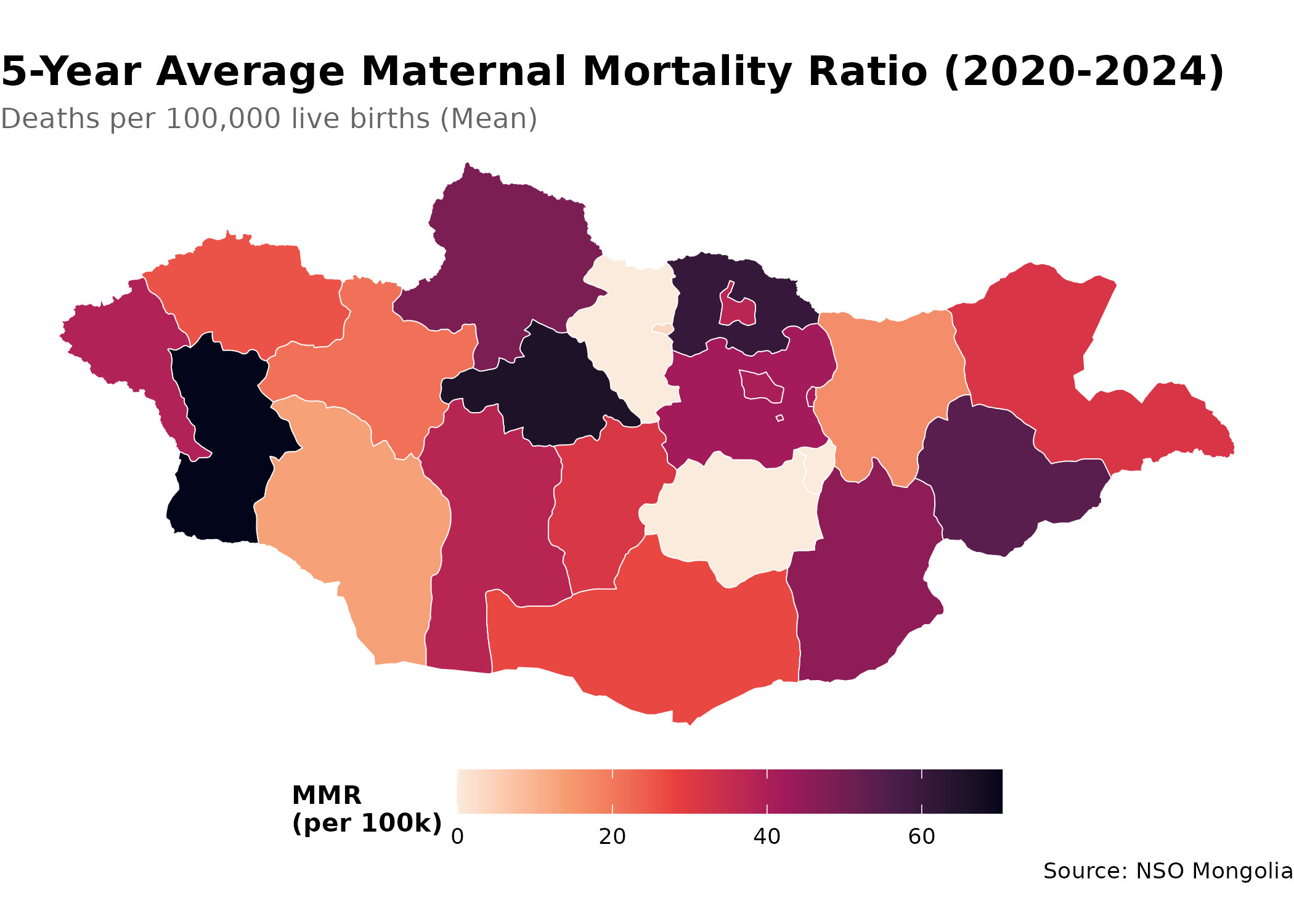
Case Study: Infant Mortality Hot Spots
Identifying High-Risk Regions
# Get infant mortality rates
imr_tbl <- "DT_NSO_2100_015V1" # IMR per 1,000 live births (Monthly)

# Get metadata
months <- nso_dim_values(imr_tbl, "Month", labels = "en")
months_2024 <- months |>
  filter(grepl("2024", label_en)) |>
  pull(code)

imr_data <- nso_data(
  tbl_id = imr_tbl,
  selections = list(
    "Region" = nso_dim_values(imr_tbl, "Region")$code,
    "Month" = months_2024
  ),
  labels = "en"
) |>
  # Exclude Total ("0"), regional aggregates ("1"-"4"), and "511" -- a
  # duplicate Ulaanbaatar entry whose values are all missing in this table.
  # Ulaanbaatar's actual data lives under code "5", so filtering by
  # nchar(Region) == 3 would keep the empty duplicate and drop the real one.
  filter(!Region %in% c("0", "1", "2", "3", "4", "511")) |>
  mutate(Region_en = trimws(Region_en)) |>
  # Average the monthly rates for 2024. Caveat: a mean of monthly IMR values
  # is not the true annual IMR (total infant deaths / total live births x
  # 1,000); for small aimags a month with few births can produce an extreme
  # ratio, so treat these as indicative rather than exact.
  group_by(Region_en) |>
  summarise(value = mean(value, na.rm = TRUE), .groups = "drop") |>
  mutate(
    # Classify risk levels
    risk_category = case_when(
      value < 10 ~ "Low (<10)",
      value < 20 ~ "Medium (10-20)",
      value < 30 ~ "High (20-30)",
      TRUE ~ "Very High (≥30)"
    ),
    risk_category = factor(
      risk_category,
      levels = c("Low (<10)", "Medium (10-20)", "High (20-30)", "Very High (≥30)")
    )
  )

# Create risk category map (fuzzy name join reconciles spelling differences;
# max_distance = 3 covers the Khuvsgul/Hovsgel spelling gap)
p <- mn_fuzzy_join_by_name(
  imr_data,
  name_col = "Region_en", level = "ADM1", max_distance = 3
) |>
  ggplot() +
  geom_sf(aes(fill = risk_category), color = "white", size = 0.2) +
  scale_fill_manual(
    values = c(
      "Low (<10)" = "#27ae60",       # green = good outcome
      "Medium (10-20)" = "#f1c40f",  # yellow = caution
      "High (20-30)" = "#e67e22",    # orange = concerning
      "Very High (≥30)" = "#c0392b"  # red = critical
    ),
    na.value = "grey90",  # missing data shown in light grey
    name = "Risk Level\n(IMR)",
    drop = FALSE  # show all levels even if not present in data
  ) +
  labs(
    title = "Infant Mortality Risk Categories (2024 Average)",
    subtitle = "Deaths per 1,000 live births",
    caption = "Source: NSO Mongolia"
  ) +
  theme_void() +
  theme(
    plot.title = element_text(face = "bold", size = 16),
    plot.subtitle = element_text(color = "grey40"),
    legend.position = "bottom",          # bottom legend maximizes map width
    legend.title = element_text(size = 10, face = "bold")
  )

p  # print static ggplot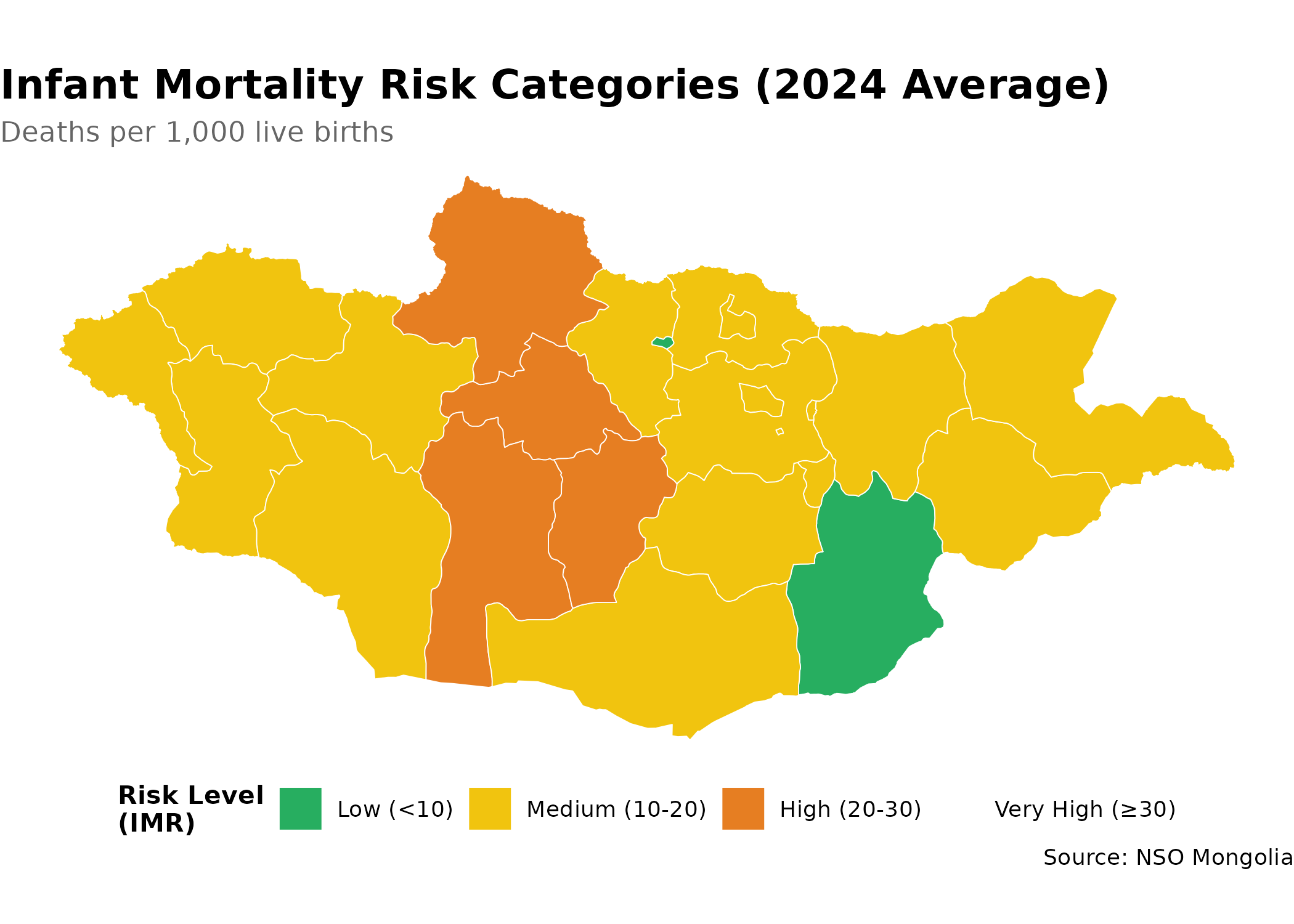
Tips for Spatial Epidemiology
- Check data completeness: Not all aimags may have data for all indicators
- Use appropriate scales: Choose color scales that highlight health disparities
- Add context: Include reference lines (e.g., national average) when relevant
- Consider population size: Normalize rates by population when comparing regions
- Temporal analysis: Create animated maps to show geographic trends over time
Next Steps
- Discover Health Data: Return to the Discovery Guide
- Learn More: Explore all functions in the Reference